Jegan - A terminal JSON editor


( English / Japanese )
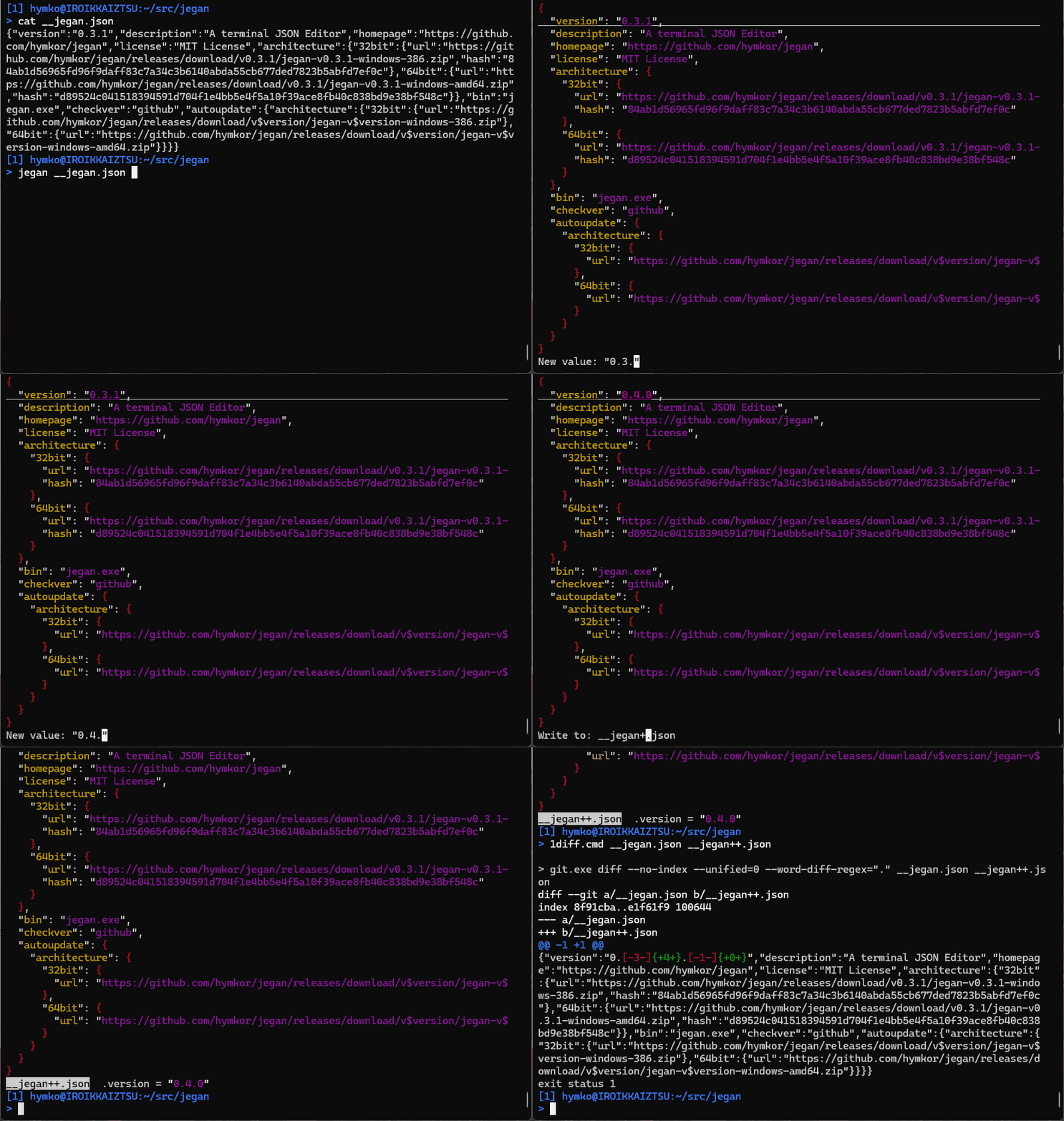
Features
🛡️ Preserve original JSON with minimal changes
Jegan keeps your JSON as close to the original as possible. Only the parts you edit are modified.
- Key order is preserved
- Whitespace, indentation, and line endings are preserved
- String representations (e.g.
\uXXXXvs raw UTF-8) are preserved - Even non-JSON parts (e.g. JavaScript wrappers) are kept intact
- Only modified fields are updated
- Changes are highlighted in bold
- Original style is reused when inserting new values
- Backup file is created on save
⚡ Instant startup even with large JSON files
Jegan starts immediately, even when loading large JSON files.
Instead of blocking on file loading, data is processed in the background and becomes available progressively.
- The UI appears instantly
- You can start navigating before the entire file is loaded
- No more waiting for the full file to load before interacting
🔄 Undo support for safe editing
- Press
uto undo recent changes - Replace operations (
r,R, etc.) can be undone - Deletions can also be undone
Deleted entries are not removed immediately but marked as <DEL>:
<DEL>entries can be restored withu<DEL>entries are omitted when saving, so deletions are finalized on disk
🧩 Collapsible view for containers
- Press
zto toggle collapse/expand for objects and arrays - Collapsed elements are displayed as a single line
📦 Supports real-world JSON formats
- JSON
- JSON Lines (JSONL)
- JavaScript-style assignments (e.g. X/Twitter archives)
🧭 Structured navigation in terminal
- Navigate items with
j/k - Horizontal scrolling for long lines
- JSON path and current value shown in status line
- Search with
/,?,n,N
🔌 CLI-friendly
- Read from file or stdin
- Write to file or stdout
- Works as a filter:
jegan < input.json > output.json
⌨️ Efficient editing
- vi-like navigation
- Emacs-style input for editing values
Install
Manual Installation
Download the binary package from Releases and extract the executable.
⚠️ Note: The macOS build is experimental and not yet tested. Please let us know if you encounter any issues!
Use eget installer (cross-platform)
brew install eget        # Unix-like systems
# or
scoop install eget       # Windows

cd (YOUR-BIN-DIRECTORY)
eget hymkor/jegan
Use scoop-installer (Windows only)
scoop install https://raw.githubusercontent.com/hymkor/jegan/master/jegan.json
or
scoop bucket add hymkor https://github.com/hymkor/scoop-bucket
scoop install jegan
Use "go install" (requires Go toolchain)
go install github.com/hymkor/jegan/cmd/jegan@latest
Note: go install places the executable in $HOME/go/bin or $GOPATH/bin, so you need to add this directory to your $PATH to run jegan.
Usage
jegan some.json
or
jegan < some.json
Key bindings
F1: Show help screen (pressqto close)j,↓,Ctrl-N: Move to the next itemk,↑,Ctrl-P: Move to the previous iteml,→,Ctrl-F: Scroll the view to the righth,←,Ctrl-B: Scroll the view to the left0,^: Reset horizontal scroll (jump to column 0)Space,PageDown: Move to the next page of itemsb,PageUp: Move to the previous page of items<: Move to the first item>: Move to the last item/: Search forward?: Search backwardn: Repeat search in the same directionN: Repeat search in the opposite direction- '@' : Jump to the item specified by a JSON path
[,{: Jump to the nearest opening bracket at the parent level, or to the matching opening bracket if on a closing bracket],}: Jump to the nearest closing bracket at the parent level, or to the matching closing bracket if on an opening bracketz: Toggle collapse/expando: Insert a new item below the cursor.- For object items, enter both key and value.
- For array items, enter only the value.
- The key is used as entered (no quotes required).
- The value is interpreted as follows:
"..."→ string (escape sequences are interpreted)- Input that can be parsed as a number → number
null→ nulltrue/false→ boolean{}→ empty object[]→ empty array- Otherwise → string (used as-is)
Ctrl+Gcancels the current input- Empty input is treated as an empty string (
""). - Duplicate keys in objects are not allowed.
r: Modify the item at the cursor (same input method aso)R: Modify the item at the cursor (explicitly specify the value type)d: Delete the item at the cursoru: UNDOCtrl+C: Copy the current path and value to the clipboardw: Save to fileq: Quit
Non-interactive mode (-auto)
The -auto option allows scripted, non-interactive execution by simulating key inputs.
Inputs are provided as a single string, where each step is separated by |.
Each step corresponds to either a key press or a line input.
Example:
jegan -auto "@|.architecture.\"32bit\".url|r|1|w|-|q|y" - < jegan.json > new-jegan.json
This performs the following steps:
@: jump to a JSON path.architecture."32bit".url: input the pathr: modify the item1: new valuew: save-: write to standard outputq: quity: confirm